


The short answer is yes. Amazon has not banned AI-generated product images, and sellers use them daily for lifestyle shots, scenes and backgrounds. What changed in 2026 is narrower and easier to miss: if your image contains a photorealistic person who was generated by AI, Amazon now requires you to say so, and the way you say so is not a form field or a checkbox. It is a keyword written inside the image file itself, before you upload it.
That single mechanical detail is where most of the confusion sits, and around it are three more problems nobody writes about: the tag appears to vanish after you upload, the shopper-facing label often never shows up, and adding the tag does not actually discharge the legal duty that prompted the rule. This guide covers all of it, in the order you will hit it.
Nothing here is legal advice. Amazon revises these rules, and the wording in Seller Central always takes priority over any guide, including this one.
The short version, if you only read one section
- AI-generated images are allowed on Amazon listings. There is no blanket ban.
- If an image, video or A+ module shows a photorealistic AI-generated person, you must add the keyword contains-synthetic-performer to the image's dc:subject (XMP) metadata field before uploading.
- It does not apply to real people, even if you edited them with AI tools. It does not apply to illustrations, animation or obviously fictional characters. It does not apply to images with no people in them.
- Amazon does not detect AI-generated people for you. The disclosure is yours to add.
- Amazon's own instruction is to use an IPTC-compatible metadata editor. You can also do it in macOS Preview, Windows File Explorer, ExifTool, or a browser tool.
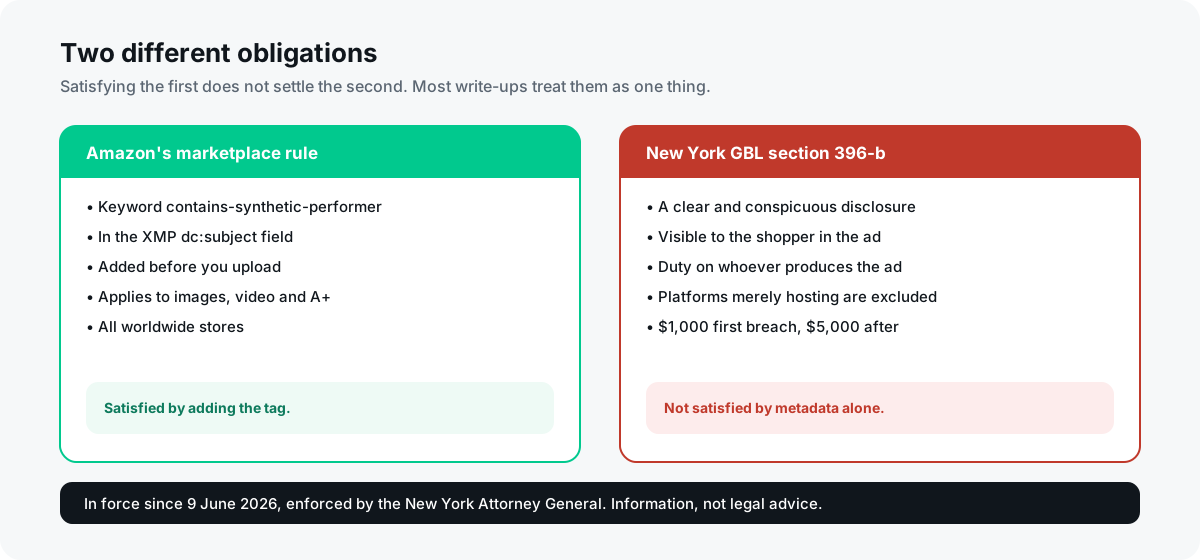
- The tag satisfies Amazon. It does not by itself satisfy the New York law behind the rule, which asks for a disclosure a shopper can actually see.
- Every other Amazon image rule still applies: pure white background on the main image, product filling around 85% of the frame, no text or badges, correct filename structure.
So what is actually allowed?
Amazon's position is not that AI imagery is suspect. Its own advertising tools generate backgrounds and lifestyle scenes, and its image policy has always been about what the picture shows rather than how it was made. A fully AI-generated kitchen behind a real photograph of your product is fine. An AI-generated texture, surface, prop or background is fine. What is regulated is the depiction of people who do not exist.
The reason is not aesthetic. It comes from advertising law, and specifically from the idea that a shopper looking at a person in an advert is entitled to know whether that person is real. That framing explains the rule's shape better than anything Amazon has published: it is narrow, it targets photorealistic humans, and it exempts everything that a reasonable viewer would not mistake for a real person.
Does your image need the tag? The five questions
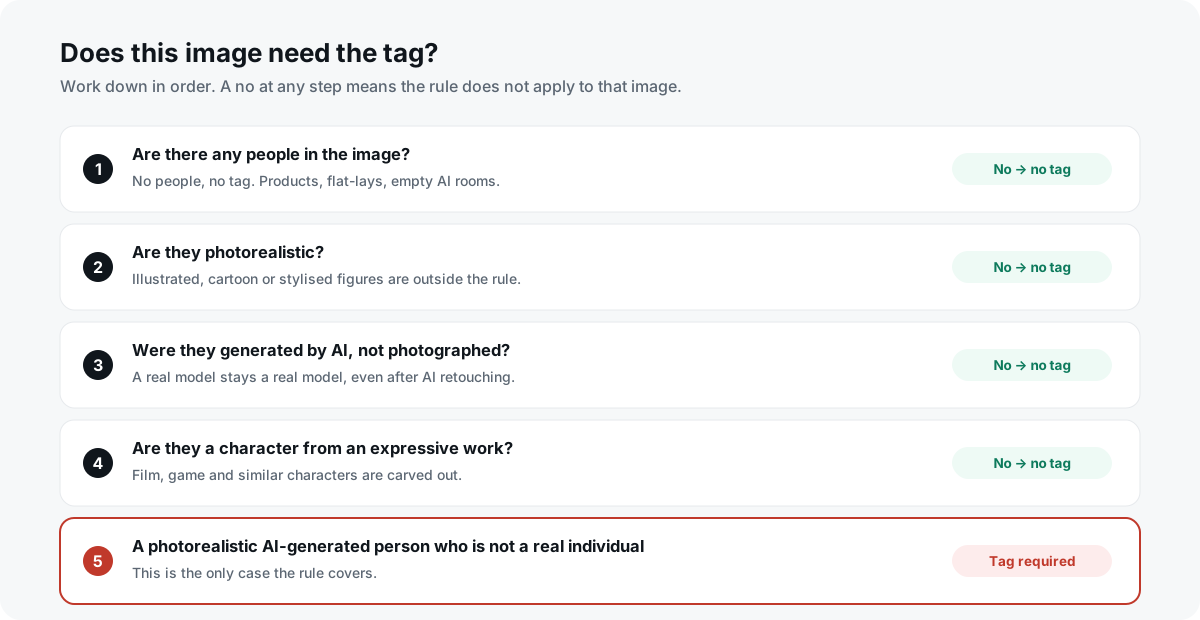
Work through these in order. If you answer no at any point, the rule does not apply to that image.
- Does the image contain a person at all? No people, no tag. A product on a white background, an AI-generated room with nobody in it, a flat-lay, a diagram: none of these are covered.
- Is the person photorealistic? Illustrated, cartoon, stylised or obviously synthetic-looking figures are outside the rule. It targets people a viewer could mistake for real.
- Was the person generated by AI rather than photographed? A real model you hired is not covered, and this holds even if you used AI tools to retouch, relight, remove a background or change the scene around them. Editing a real person with AI does not make them a synthetic performer.
- Is the person not a recognisable real individual? The rule is about people who do not exist. A digitally recreated identifiable person is a different and much more serious problem, involving likeness rights rather than this disclosure.
- Is the person actually a character from an expressive work? Characters from films, games and similar works are carved out.
One genuinely unresolved case is worth naming: sellers have asked Amazon about a partially visible AI person, such as hands holding a product or a figure cropped at the waist, and about AI backgrounds containing incidental background figures. Reporting places background figures outside the rule, but Amazon has not answered the partial-person question publicly. If your case is borderline, the honest position is that it is undefined, and the cautious choice is to tag.
The exact requirement, stated precisely
Amazon asks for the keyword contains-synthetic-performer, written into the dc:subject field of the image's XMP metadata, before the file is uploaded. It applies to product images, lifestyle images, video and A+ Content, across Amazon's worldwide stores rather than only in the regions whose laws prompted it.
Three details in that sentence do real work. The spelling and hyphens matter, because it is a machine-read keyword rather than a description. The field matters: dc:subject is the XMP property that IPTC Keywords maps onto, which is why every guide tells you to use an IPTC-compatible editor. And before upload matters, because there is no way to add it afterwards to an image already on a listing.
Three ways to add the tag
Amazon's own guidance is to go and find an IPTC-compatible metadata editor, which for most sellers means installing desktop software in order to type twenty-nine characters into one field. There are gentler routes.
- In your browser. Drop the files in, get them back tagged, nothing installed and nothing uploaded. This is what our free tagger does, and it appends the keyword to any keywords you already have rather than replacing them.
- macOS Preview. Open the image, press Command and I for the Inspector, choose the Keywords tab, click the plus button, type the keyword, then save. Reopen the file afterwards to confirm it stuck.
- Windows File Explorer. Right-click the image, choose Properties, then the Details tab, and enter the keyword in the Tags field rather than the Subject field. Click OK, then reopen to confirm.
- ExifTool, if you are comfortable on a command line. The command is: exiftool -XMP-dc:Subject+=contains-synthetic-performer yourfile.jpg. The plus-equals matters, because a plain equals sign replaces your existing keywords instead of adding to them.
Whichever route you take, verify before uploading rather than after. Reopen the file and check that the keyword is present, spelled exactly, and sitting in Keywords or Subject. The next section explains why checking afterwards will mislead you.

Why the tag disappears after you upload
This is the single most confusing thing about the rule, and almost nothing written about it mentions the problem. Sellers on Amazon's own forums report that Amazon reprocesses listing images after upload, and that the live image you download back from your own listing no longer contains the XMP tag. The same sellers report that A+ Content modules do keep it.
The consequence is practical and important. You cannot verify compliance by downloading your live listing image, because the tag being absent there tells you nothing at all. It does not mean your tagging failed and it does not mean Amazon rejected it. It means the file you are looking at is a re-encoded derivative, not the file you sent.
So: check the file before it goes up, and keep the tagged original. If you ever need to demonstrate that you disclosed, the original is your evidence, not the listing image.
Why no AI label appears on your listing
Amazon says it will surface a disclosure to shoppers where applicable. Sellers report embedding the metadata correctly and seeing no visible indicator on the listing at all. An Amazon representative acknowledged a batch of questions about this on the seller forums and said the relevant teams were working on responses, which had not been posted at the time of writing.
A missing label is not evidence that your tag failed. It does have a consequence worth understanding though, and it is the subject of the next section.
The tag is not the same as complying with the law
This is the part that matters most and appears almost nowhere else, so it is worth being precise about.
The rule exists because of legislation. New York's synthetic performer disclosure law, General Business Law section 396-b, took effect on 9 June 2026. California's AI Transparency Act phases in from August 2026. New York's carries reported penalties of 1,000 dollars for a first violation and 5,000 dollars for later ones, enforced by the state Attorney General, with no private right of action and an actual-knowledge standard.
Here is the gap. The statute asks for a clear and conspicuous disclosure that a shopper can see in the advertisement. Legal commentary on it is that embedded metadata alone would not meet that standard, and that the disclosure should be prominently displayed in plain language such as AI-generated performer. Metadata is treated as provenance record-keeping, not as the disclosure itself. The duty falls on whoever produces or creates the advertisement, which is you, and platforms that merely host advertisements are expressly excluded, which means Amazon is not carrying this for you.
Presumably Amazon intends to read your metadata and render the visible label, which would close the loop. But sellers report the label is not appearing. If it never appears on your listing, the consumer-facing disclosure the statute contemplates does not exist there, and no metadata tool can create it.
Practically: add the tag because Amazon asks for it, and treat your legal position as a separate question. If AI-generated people appear in your advertising at any scale, that is worth an hour with someone qualified rather than an afternoon reading blog posts. We design listings for a living and are not lawyers.
Amazon will not do this for you
Every source agrees on this and it is worth stating flatly: do not assume Amazon will identify the AI-generated person and apply the tag on your behalf. The disclosure is seller-supplied. Amazon's role is to read the metadata you provide, not to detect what you did not declare.
There is one reported exception. Some A+ Content and Creative Assets upload workflows are said to offer an AI-generated people checkbox that writes the metadata for you. Ordinary listing image uploads do not, which is exactly why the keyword has to be inside the file before it goes anywhere.
The rules that actually get images rejected
Worth keeping in proportion. In practice, far more listings are held up by ordinary image requirements than by the AI disclosure, and the disclosure has no bearing on any of them.
- Main image background must be pure white, RGB 255, 255, 255, not near-white.
- The product should fill around 85% of the main image frame, whole and uncropped.
- No text, logos, badges, borders, watermarks or review graphics on the main image.
- Longest side of at least 1,000 pixels for zoom to work, 2,000 or more recommended, 10,000 maximum.
- JPEG is the recommended format, in RGB rather than CMYK.
- Filenames use periods to separate the identifier, variant code and extension, with no spaces or dashes.
Those are covered properly in our guide to Amazon's image requirements. An AI-generated lifestyle image that is beautifully tagged and sitting on a cream background rather than a white one will still be the thing holding your listing back.
Add the tag in your browser, free →Can you use AI-generated images on Amazon?
Yes. Amazon does not prohibit AI-generated product images, backgrounds or lifestyle scenes. The requirement that applies is disclosure rather than a ban: if an image contains a photorealistic AI-generated person, you must add the keyword contains-synthetic-performer to the image's dc:subject XMP metadata before uploading. Images with no people in them are unaffected.
Does Amazon allow AI-generated models in product photos?
Yes, provided you disclose them. An AI-generated person who does not exist is exactly what the rule covers, so the image needs the metadata keyword. A real model you photographed does not need it, and that stays true even if you used AI tools to retouch the shot, change the background or relight the scene.
What is contains-synthetic-performer?
It is the exact keyword Amazon requires in an image's dc:subject (XMP) metadata field when the image contains photorealistic AI-generated people. The spelling and hyphens matter because it is machine-read. It applies to product images, lifestyle images, video and A+ Content across Amazon's worldwide stores.
How do I add contains-synthetic-performer to an image?
Four practical routes. A browser tool that writes it without installing anything. macOS Preview: Command and I, Keywords tab, plus button. Windows File Explorer: right-click, Properties, Details tab, and use the Tags field. Or ExifTool on the command line with exiftool -XMP-dc:Subject+=contains-synthetic-performer yourfile.jpg, where the plus-equals adds to your existing keywords instead of replacing them.
Do I need to tag an AI-generated background with no people in it?
No. The rule is about photorealistic AI-generated people. An AI background, an AI-generated surface or prop, an empty AI-generated room: none of these require the tag. Reporting also places incidental background figures outside the rule, though Amazon has not addressed every edge case directly.
Do I need to tag illustrations or cartoon characters?
No. The rule targets photorealistic people who could be mistaken for real. Illustrated, animated or clearly stylised figures are outside it, and characters from films, games and other expressive works are specifically carved out.
I tagged my image but the tag is gone after uploading. Did it fail?
Almost certainly not. Sellers report that Amazon reprocesses listing images after upload, so the live image you download back no longer carries the XMP tag, while A+ Content modules do retain it. This means you cannot verify by downloading your own listing image, because the tag's absence there tells you nothing. Verify the file before uploading and keep the tagged original.
Why is there no AI disclosure label showing on my listing?
Several sellers have reported exactly that: metadata correctly embedded, no visible indicator on the listing. Amazon says it will surface a disclosure where applicable, but the rollout does not appear complete and Amazon acknowledged a batch of seller questions without answering them publicly. A missing label is not evidence that your tag failed.
Does adding the tag make me legally compliant?
No, and this is the most important caveat on this page. New York's General Business Law section 396-b, in force since 9 June 2026, requires a clear and conspicuous disclosure that a shopper can see in the advertisement itself. Legal commentary is that embedded metadata alone would not meet that standard. The duty falls on whoever produces the advertisement rather than the platform hosting it. Add the tag because Amazon asks for it, and treat the legal question as separate and worth proper advice.
What happens if I do not tag an AI-generated person?
Amazon has not published a listing-level enforcement mechanism, and reporting suggests enforcement is arriving gradually. The sharper exposure is legal: New York's law carries reported penalties of 1,000 dollars for a first violation and 5,000 dollars for later ones, enforced by the state Attorney General, under an actual-knowledge standard, which matters because you do know whether you used an AI-generated person.
Does Amazon detect AI-generated images automatically?
No. Do not assume Amazon will spot the person and apply the tag for you. The disclosure is seller-supplied. Some A+ Content and Creative Assets workflows are reported to offer an AI-generated people checkbox that writes the metadata automatically, but ordinary listing image uploads do not.
Does tagging affect Content Credentials or C2PA data in my AI image?
The C2PA manifest is preserved, but C2PA also stores a hash of the file, so adding any metadata makes its integrity check report a mismatch afterwards. This is not specific to any one tool: ExifTool produces the identical result. If a verifiable Content Credential matters to you, add the keyword at generation time rather than afterwards.
Does adding metadata change my image quality?
It should not. Adding a keyword only inserts a metadata segment; it does not re-encode the picture. A tool that returns your image at a different size or with visibly different quality is re-saving it rather than tagging it, which is worth checking before you trust one.
One caveat covering every figure above: Amazon revises its policies, no state guidance on what counts as conspicuous had been issued at the time of writing, and the descriptions of New York and California law here come from published legal commentary rather than from us. Check Seller Central for the current wording, and treat anything with a penalty attached as a question for a professional.