


Search for Amazon's image requirements and you will be told, confidently and repeatedly, that the minimum size is 1,000 pixels on the longest side. You will also find guides insisting it is 500. Both numbers appear on Amazon's own help pages, on two different articles, and they are not contradicting each other. They are answering two different questions, and knowing which is which is the difference between an image that uploads and an image that actually sells.
This is the full specification as Amazon currently publishes it, written for someone who has to act on it today. Sixteen years of building these sets for clients is where the judgement parts come from; everything factual is checked against Seller Central rather than repeated from other blogs.
The quick answer
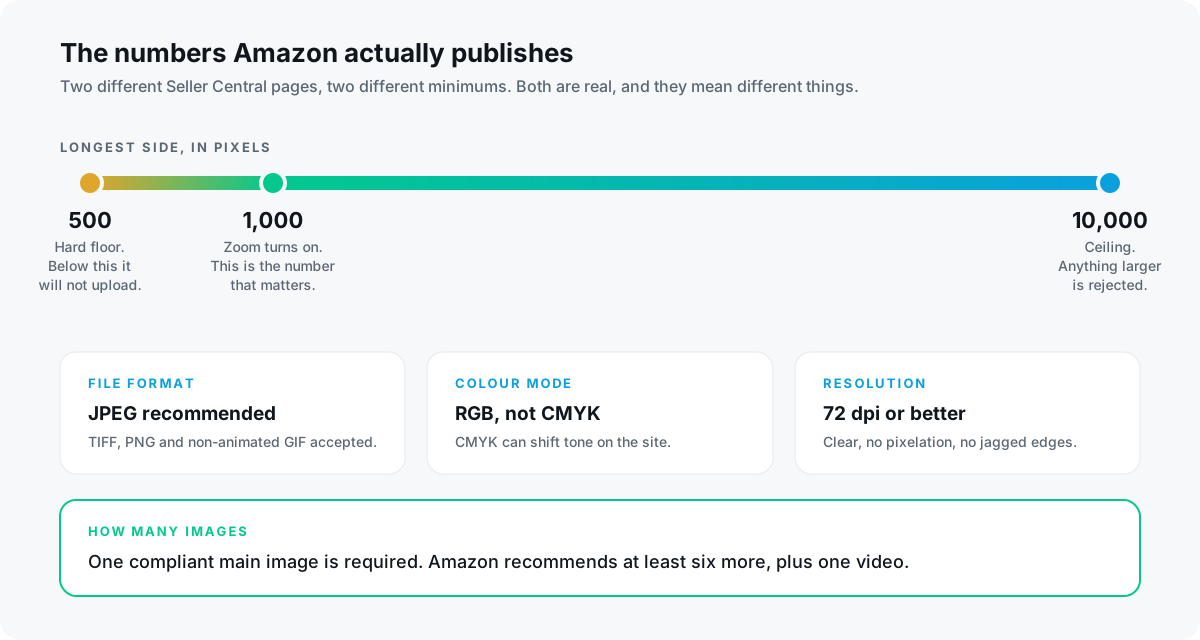
- 500 pixels on the longest side is the hard floor. Below it, the image will not upload at all.
- 1,000 pixels or larger is what switches on the zoom function. This is the number you should actually design to.
- 10,000 pixels on the longest side is the ceiling.
- JPEG is recommended. TIFF, PNG and non-animated GIF are accepted.
- RGB is preferred over CMYK, because CMYK can shift tone once it renders on the site.
- Every product needs one compliant main image. Amazon recommends at least six more, plus one video.
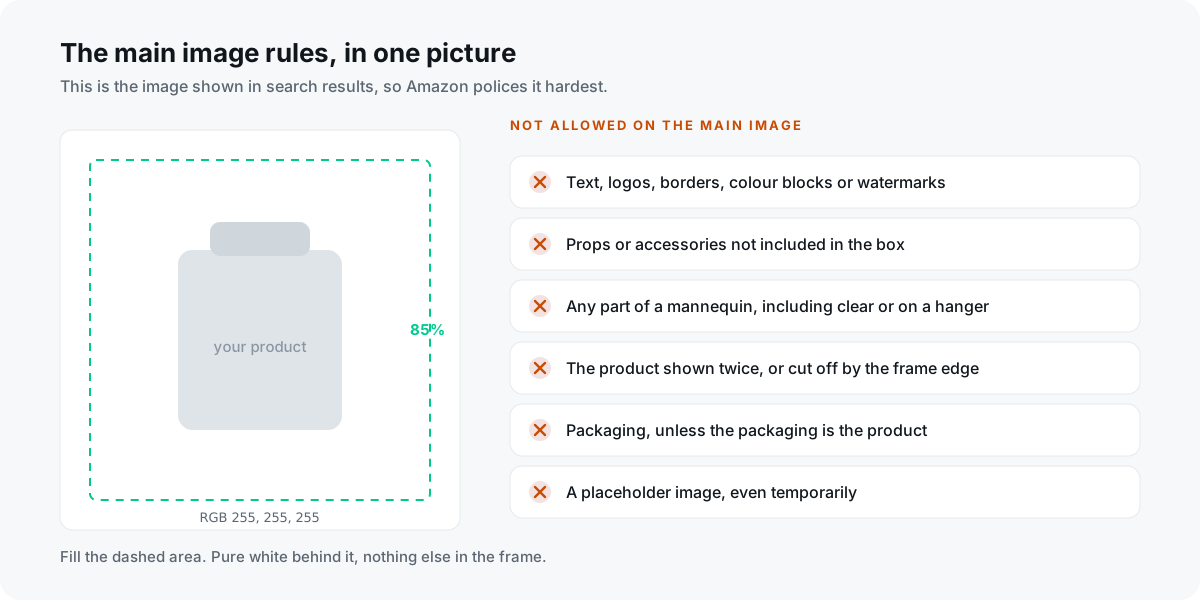
- The main image must be on a pure white background (RGB 255, 255, 255) with the product filling 85% of the frame.
Why there are two minimums
Amazon's Product image guide lists the image size requirement as a minimum of 500 pixels and a maximum of 10,000 pixels on the longest side, and marks it as required. Amazon's Technical image file requirements page says images should be 1,000 pixels or larger on the longest side, and explains why: that is the size that enables the zoom function on the website.
So 500 is the gate. 1,000 is the goal. An image at 800 pixels will upload perfectly happily and will quietly not zoom, which is the kind of failure nobody notices because nothing appears broken. Shoppers just cannot inspect your product, and on categories where texture and finish decide the sale, that is a real cost.
In practice there is no reason to sit anywhere near either number. Export at 2,000 pixels or more on the longest side and you clear the zoom threshold with room to spare, well inside the 10,000 ceiling.
The rest of the technical specification
- File formats: JPEG (.jpg or .jpeg) is recommended. TIFF (.tif or .tiff), PNG (.png) and GIF (.gif) are accepted, GIF non-animated only.
- Colour: RGB or CMYK are both accepted, but RGB is preferred, because CMYK sometimes shows colour-tonal variations when displayed on the site.
- Resolution: at least 72 dpi, and images must be clear, unpixellated, with no jagged edges.
- File naming: product identifier + variant code + file extension, separated by periods, for example B000123456.MAIN.jpg. Spaces, dashes or additional characters will stop the image uploading. The product identifier can be the ASIN, barcode, UPC, EAN, ISBN, GTIN or JAN.
That file-naming rule catches more people than it should. It is not a style preference; a hyphen in the filename is enough to make the upload fail with an error that does not obviously point at the filename.
The main image rules, in full
The first image on the detail page is the main image, and it is also the one shown in search results. Amazon's requirements for it are specific and enforced.
- It must accurately represent the product as a realistic, professional-quality image, including real scale, quantity and colour.
- Pure white background, RGB 255, 255, 255. Not off-white, not a very light grey that looks white on your monitor.
- The product must be shown as 85% of the image.
- No text, logos, borders, colour blocks, watermarks or other graphics, either covering the product or in the background.
- The entire product must be within the frame, with no part cut off.
- Show the product only once. Not the front and the back in the same image.
- One unit only, plus any accessories that are genuinely included. No props that are not in the box, because they confuse the buyer about what they are getting.
- No packaging, unless the packaging is itself a feature, such as a carrying case or a gift basket.
- No part of a mannequin, in any form: clear, solid-colour, flesh-toned, framework, or on a hanger.
- Products made of multiple pieces must be shown relative in size, with no single piece enlarged.
- No placeholders, even temporarily. The first image uploaded defines the product identity, and using a placeholder can block your intended image from uploading later.
- Footwear has its own rule: a single shoe, facing left, at a 45-degree angle.
Only a limited number of product types are permitted to use a lifestyle image as the main image. Unless you have confirmed yours is one of them, assume white background.
The placeholder rule deserves emphasis because the consequence is delayed. Uploading a temporary image to get a listing live, intending to replace it, can lock in the wrong product identity and cause your real photograph to be rejected later. It is a five-minute shortcut that costs a support case.
The rules that apply to every image, not just the main one
- Every image must accurately represent the product and match the product's title.
- No nudity or sexually suggestive imagery, including illustrations as well as models.
- Children's and baby undergarments, leotards, swimwear and similar form-fitting items must be photographed lying flat, without models.
- No images of customer reviews, no five-star imagery, no claims such as free shipping, and no seller-specific information.
- No text or pricing details, with the exception of swatch images.
- No Amazon logos or trademarks, or anything confusingly similar, including the words Amazon, Prime, Alexa, or the Amazon Smile design.
- No badges used on Amazon or lookalikes of them, including Amazon's Choice.
The badge rule is the one that trips up otherwise careful sellers. A tidy five-star graphic on an infographic slot feels like good design and is a policy violation, because it imitates Amazon's own review furniture.
The new rule: disclosing AI-generated people
This one is recent enough that most guides have not caught up with it. Some jurisdictions require disclosure when a product image contains photorealistic AI-generated people. Amazon's mechanism for that is metadata rather than a visible label you add yourself.
If your image includes photorealistic AI-generated people, you must tag the file before uploading it. Using an IPTC-compatible metadata editor, add the keyword contains-synthetic-performer to the dc:subject (XMP) field of the image file. Where applicable, Amazon then adds the disclosure to the image itself.
The boundary matters. The tag is for people entirely generated by AI, not based on a real person. You do not add it if your image only features real people, even where they have been altered with AI-powered tools.
If you are generating lifestyle imagery with AI, which plenty of sellers now are, this is a compliance step to build into the workflow rather than remember later. The tag lives in the file's metadata, so it must be applied before upload, not after.
What actually happens when an image fails
Images that fail Amazon's technical or product requirements cannot be uploaded to the system at all. There is no silent degradation: the file is refused.
To see why, go to Submission status and click Issue reason to review the report. You have to fix the flagged issues before re-uploading, and re-submitting the same file without changing it will fail the same way. If images uploaded successfully but are not appearing on the detail page, that is a separate problem with its own troubleshooting path in Seller Central, and it is worth checking before you re-export anything.
Deciding what goes in the seven slots
Everything above is compliance. It stops your listing being blocked; it does nothing to make it sell. Amazon requires one main image and recommends at least six more plus a video, and the difference between listings is almost never image quality. It is whether each slot removes a reason not to buy.
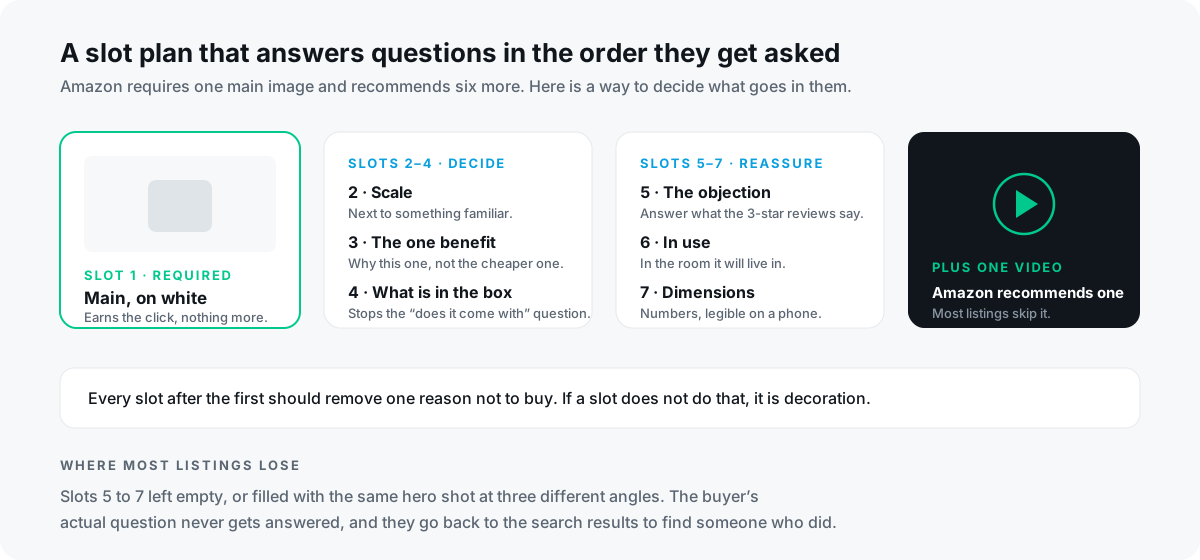
- Slot 1, main image: earns the click, and nothing else. White background, product at 85%, no cleverness.
- Slot 2, scale: the product next to something a buyer already understands the size of. Scale confusion is one of the most common causes of returns.
- Slot 3, the one benefit: why this product rather than the cheaper one directly beside it in search results.
- Slot 4, what is in the box: kills the does-it-come-with question before it becomes a message or a refund.
- Slot 5, the objection: read your own three-star reviews, and your competitors', find the recurring complaint, and answer it visually.
- Slot 6, in use: the product in the room it will actually live in, at a believable size.
- Slot 7, dimensions and specifications: real numbers, set large enough to read on a phone.
- Plus the video Amazon recommends, which most listings still skip entirely.
The most common failure is not an ugly image. It is slots five to seven left empty, or filled with the same hero shot photographed from three angles. The buyer's actual question goes unanswered and they return to the search results to find someone who answered it.
A pre-upload checklist
- Longest side comfortably above 1,000 pixels, and under 10,000.
- Exported as JPEG, in RGB, at 72 dpi or better.
- Filename is identifier, variant code and extension separated by periods, with no dashes or spaces.
- Main image background sampled and confirmed as 255, 255, 255, not near-white.
- Product occupies roughly 85% of the main image frame, whole, shown once, alone.
- No text, badges, review graphics, borders or Amazon-lookalike marks anywhere in the set.
- Any photorealistic AI-generated people tagged with contains-synthetic-performer before upload.
- Every slot after the first answers a different buyer question.
What is the minimum image size for Amazon listings?
Amazon's Product image guide sets the minimum at 500 pixels on the longest side, with a maximum of 10,000. However, Amazon's technical requirements page states that images should be 1,000 pixels or larger, because that is what enables the zoom function on the site. Design to 1,000 or above.
Does the Amazon main image have to be on a white background?
Yes, pure white at RGB 255, 255, 255. Only a limited number of product types are permitted a lifestyle main image, so unless you have confirmed yours is one of them, use white.
How much of the frame should the product fill on Amazon?
Amazon requires the product to be shown as 85% of the image on the main image, with the entire product inside the frame and no part cut off.
Can I put text or a logo on my Amazon main image?
No. Text, logos, borders, colour blocks, watermarks and other graphics are prohibited on the main image, whether they cover the product or sit in the background. Secondary images have more latitude, but review graphics, pricing, claims and Amazon-lookalike badges are prohibited across the whole set.
How many images should an Amazon listing have?
One compliant main image is required. Amazon recommends uploading at least six additional images and one video to help customers evaluate the product.
Do I need to disclose AI-generated images on Amazon?
If an image contains photorealistic AI-generated people, you must add the keyword contains-synthetic-performer to the dc:subject (XMP) field using an IPTC-compatible metadata editor before uploading. It does not apply to images of real people, even if they were altered using AI tools.
Why was my Amazon image rejected?
Images that fail the technical or product requirements cannot be uploaded. Check Submission status and click Issue reason to see the specific report, fix what is flagged, then re-upload. A common cause is the filename: it must use periods to separate the identifier, variant code and extension, with no spaces or dashes.
What image format is best for Amazon?
JPEG is Amazon's recommended format. TIFF, PNG and non-animated GIF are accepted. Use RGB rather than CMYK, since CMYK can produce tonal shifts when rendered on the site.
One honest caveat: Amazon updates these pages, and category-level style guides add requirements on top of the general ones. Everything here reflects what Seller Central publishes at the time of writing, and the category style guide for your specific product is always worth reading alongside it.
Compliance you can check yourself with a checklist. The harder question is which of your seven images is costing you the most conversions right now, and that is not something you can eyeball on your own listing, because you already know what the product is. That is the problem we built PikScore to solve: paste an ASIN and it scores each image, flags the compliance risks, benchmarks the set against the top sellers in your category, and names the one image to fix first.
Run a free audit on your listing with PikScore →